How to Translate your WordPress Website using qTranslate Plugin
This tutorial will teach you how to translate your WordPress based website in multi-languages using the qTranslate plugin. Below are step by step implementation with colorway theme but this process is applicable with all our wordpress themes and other themes as well.
1. Introduction
qTranslate is a free plugin which helps to translate the theme to multilingual content with the help of wordpress. qTranslate supports infinite languages, which can be easily added/modified/deleted via the comfortable Configuration Page. All you need to do is activate the plugin and start writing the content!
2. Download qTranslate plugin
To download qTranslate plugin just visit: http://wordpress.org/extend/plugins/qtranslate/
3. Plugin Installation
Installation of plugin is quite easy
- Finish downloading the plugin
- Extract the files.
- Paste the qtranslate plugin directory in /wp-content/plugins/ directory
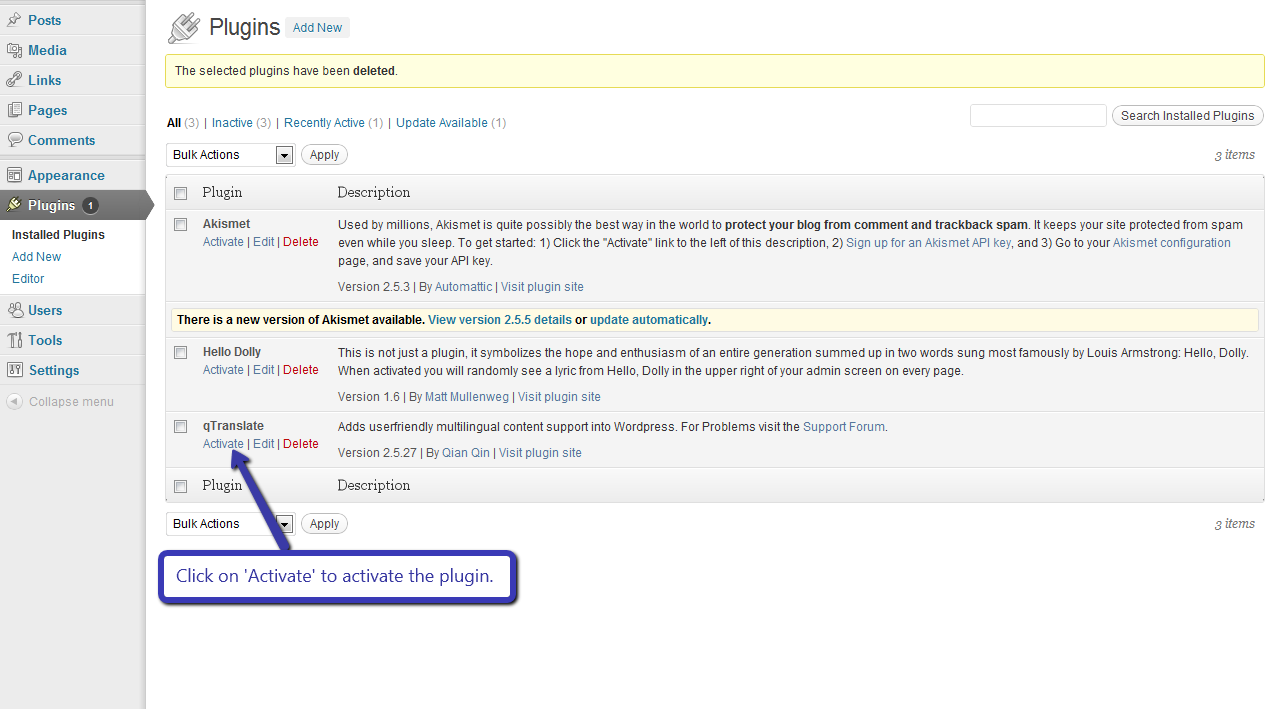
- Activate the qTranslate plugin through the ‘plugins’ tab in WordPress.
Image is shown for reference
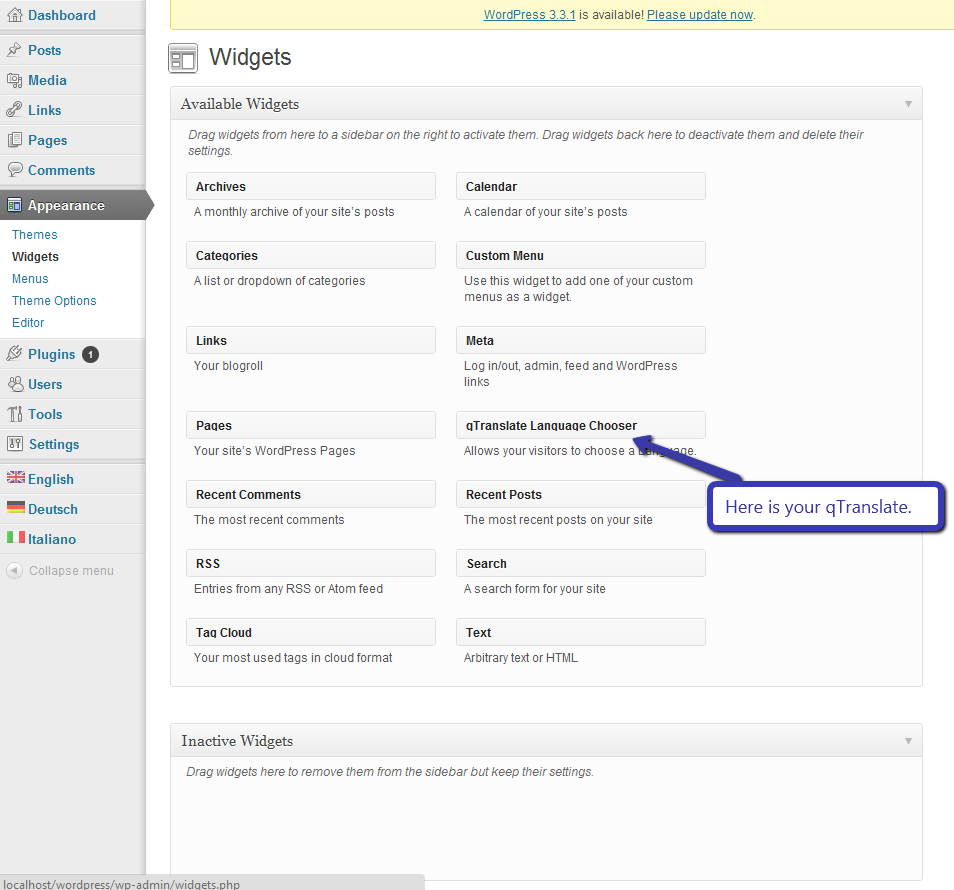
As soon as you do that, your qTranslate will show on widgets i.e.
Appearance -> Widgets
From here you can drag and drop it to any of your widget areas, This will be explained in depth later on.
4. Configuring qTranslate with Colorway WordPress Theme
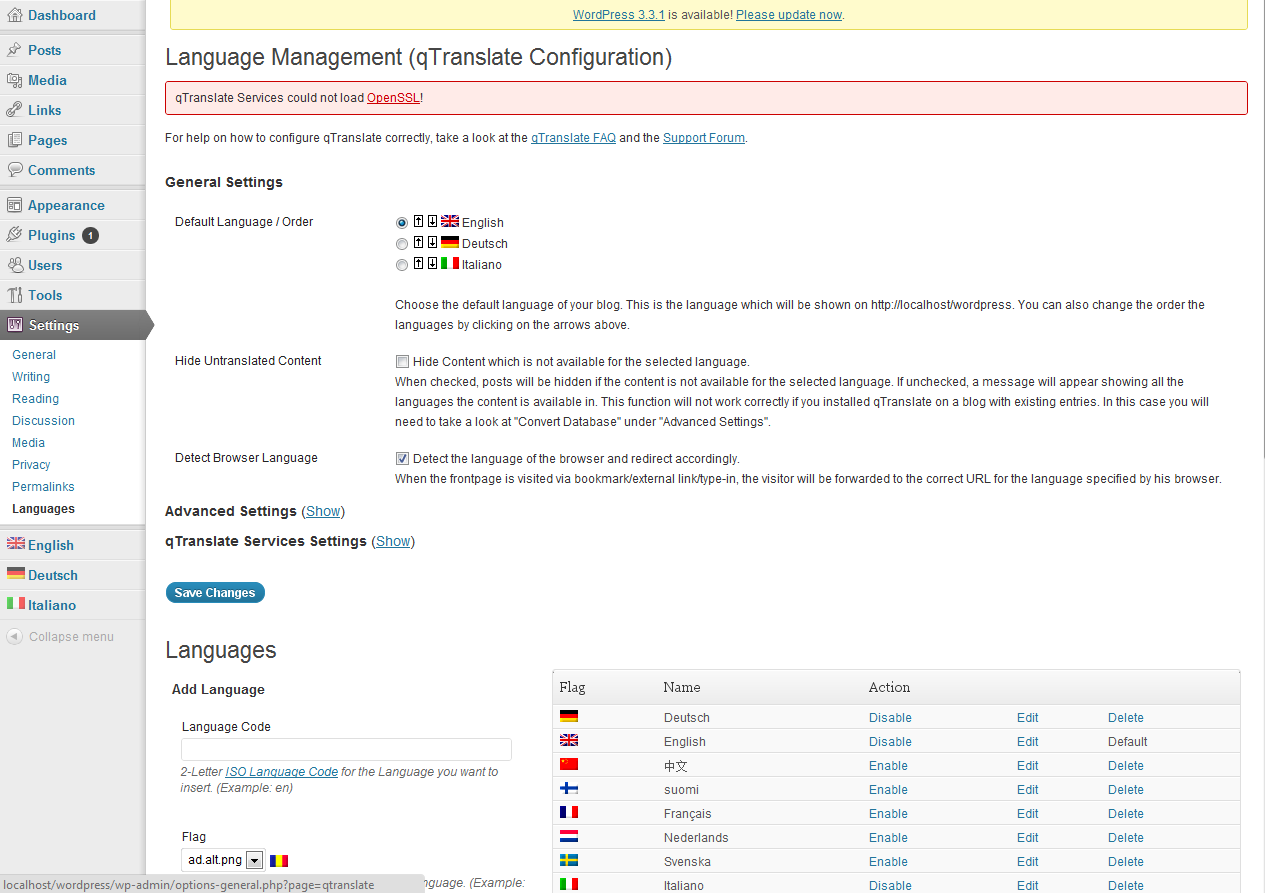
To configure go to settings and then choose languages from WordPress dashboard i.e.
Settings -> languages
This will open a setting window in wordpress as shown below
Selecting language
You can enable or disable language in which you want to translate. You can choose multiple language at a time.
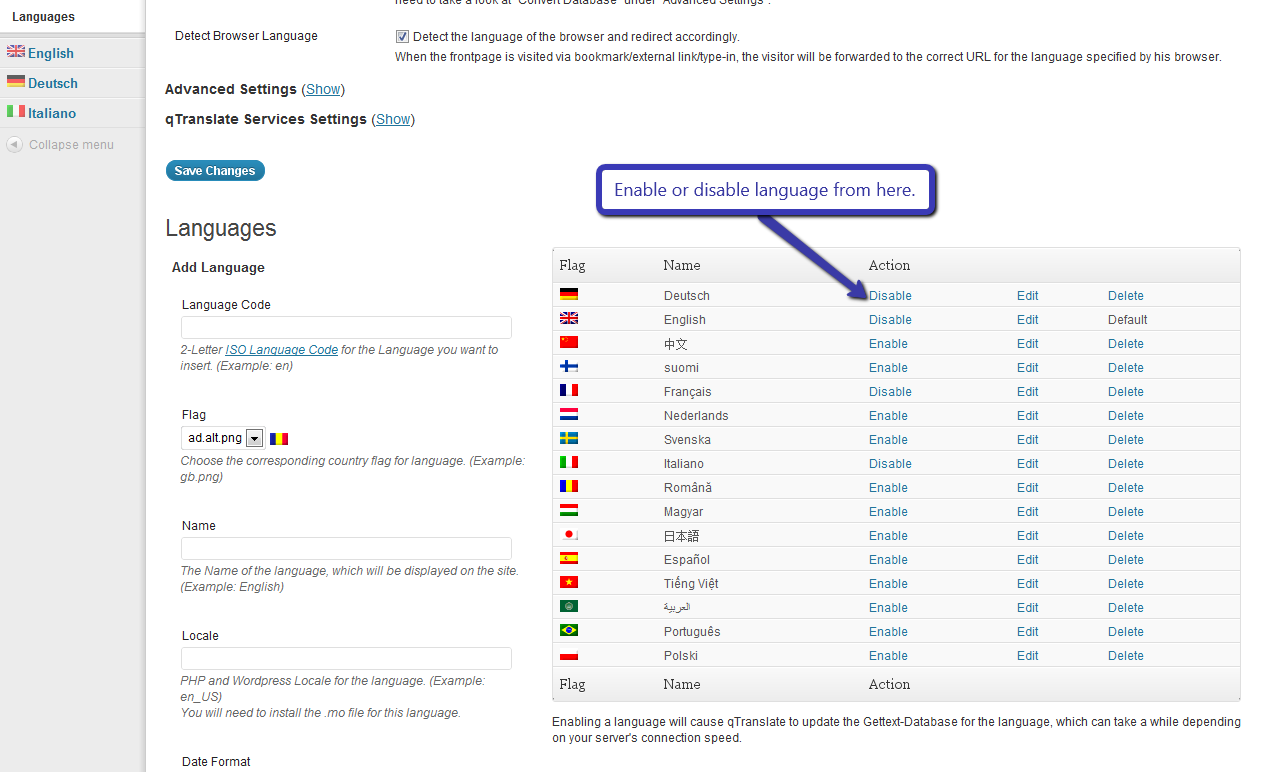
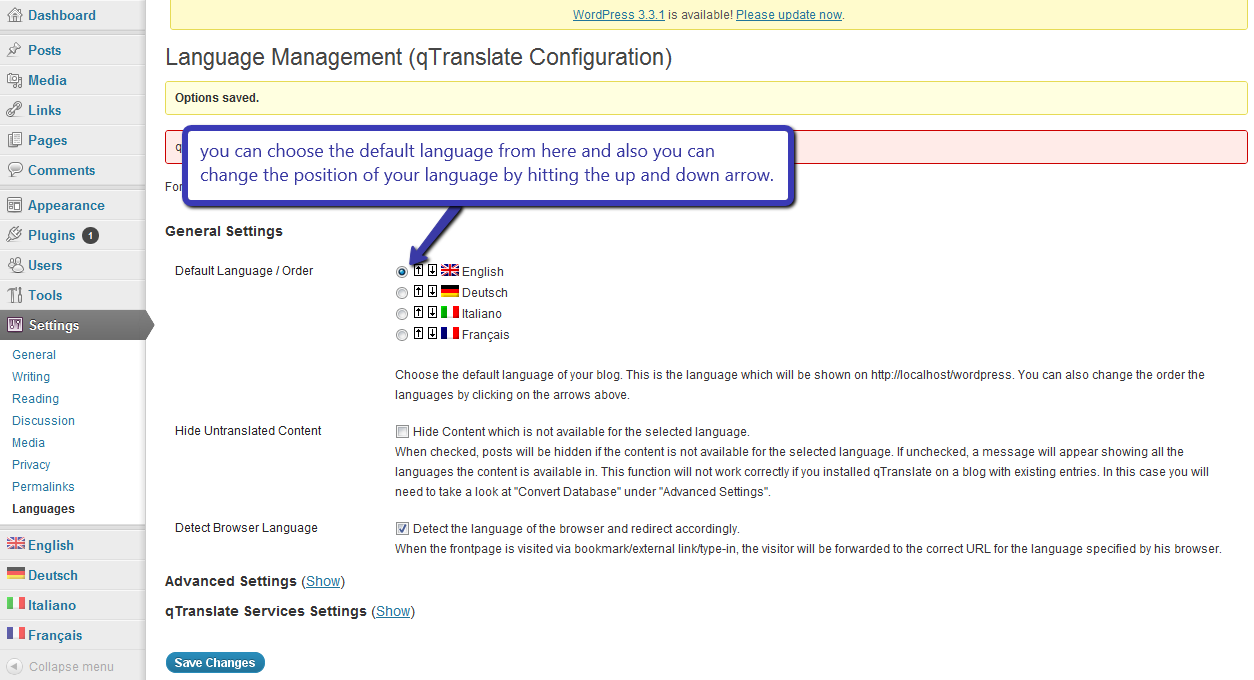
When you enable a language it will show under general setting heading. From here you can select the default language what do you want under “Default Language / Order”. And also you can choose the order of the language from here.
5. Enabling the qTranslate widget
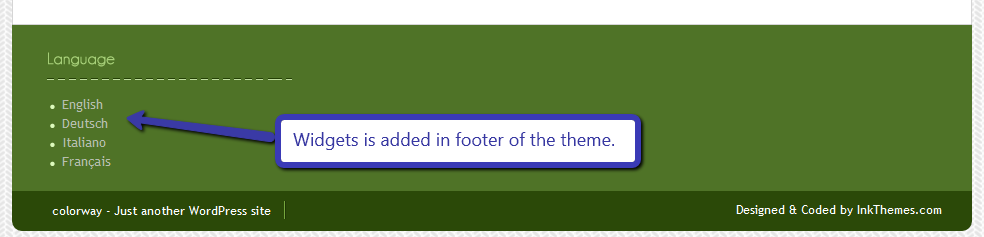
Enabling the widget is very easy. Just go to widgets section and drag and drop the “qTranslate Language Chooser” in your desired position i.e in footer or in sidebar.
Appearance -> widgets
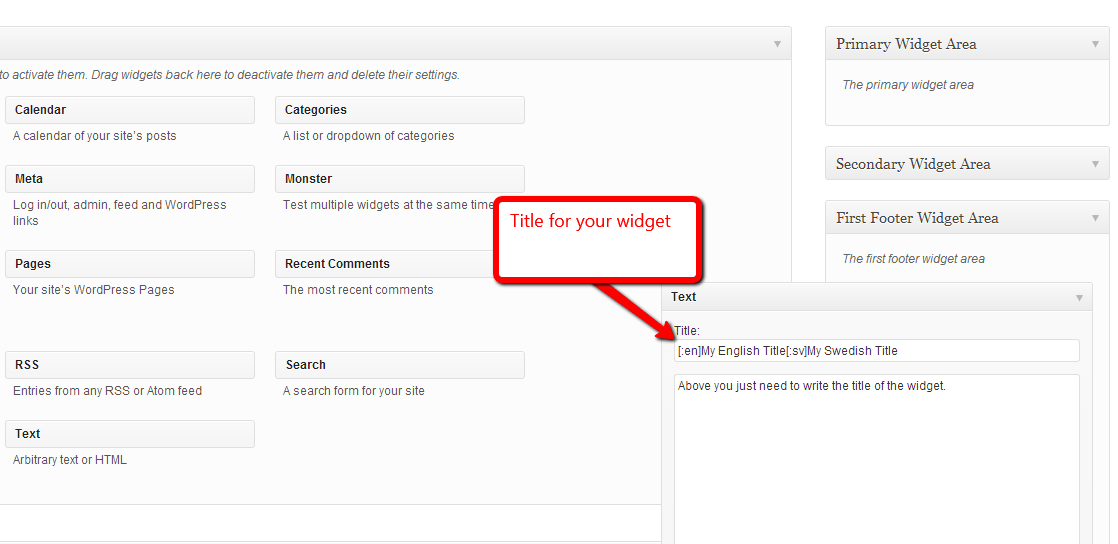
You can write the name of your widget, by default it is blank
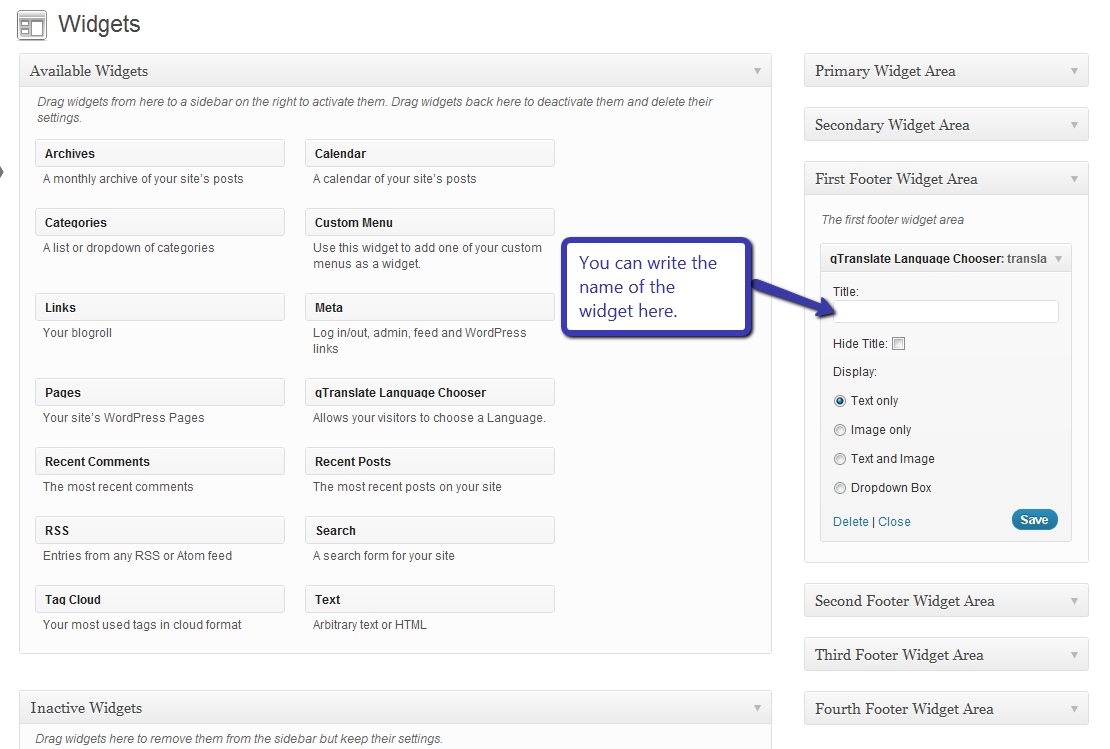
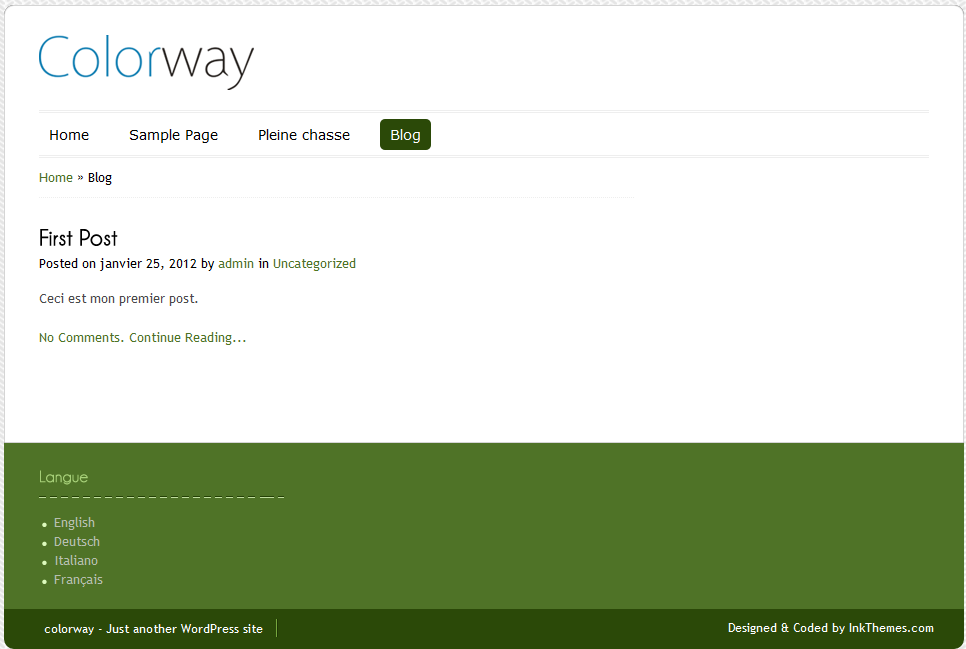
Suppose we add the widget in the first footer area then it will be displayed like this
6. How to add content in different languages
Changing the content of Home page
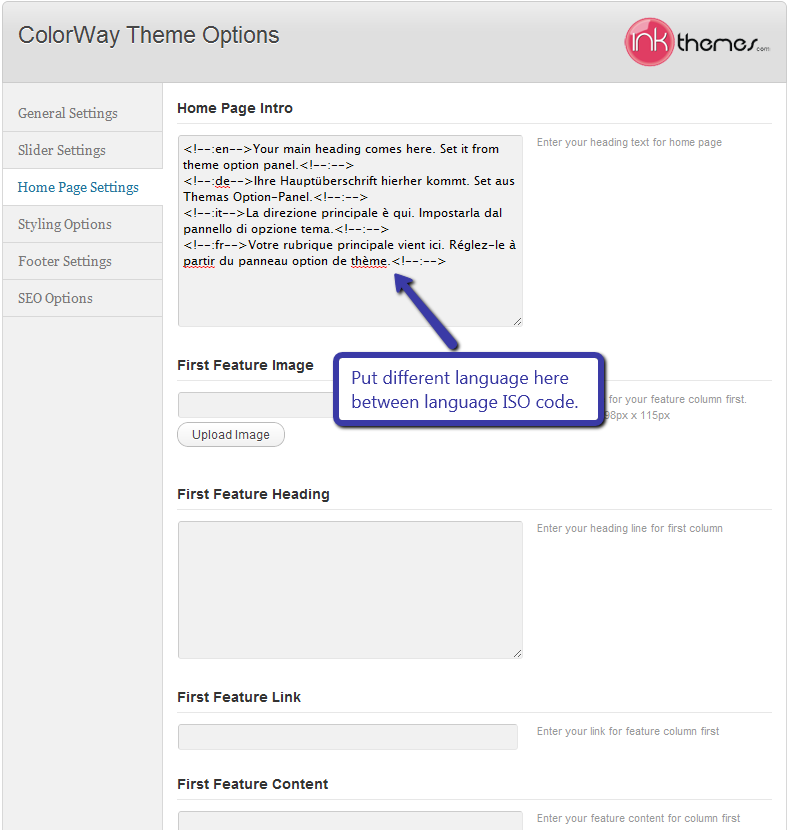
To change the content of home page just go to theme option panel and using language ISO code, put all the language translation in the same text area.
Example is shown below
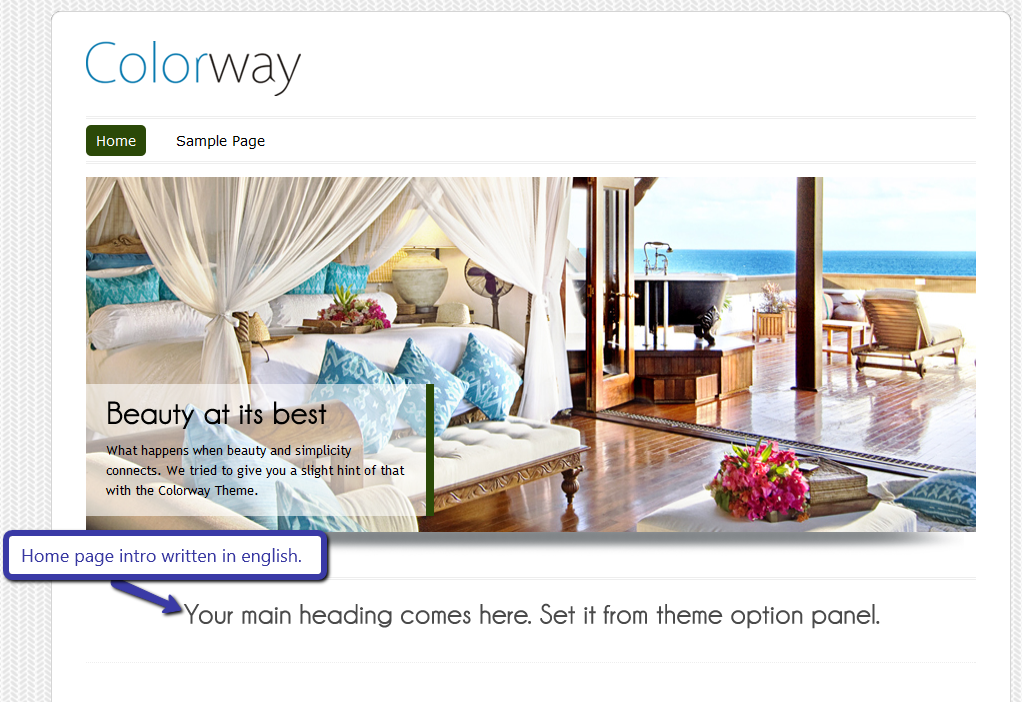
Suppose we want to translate the ‘Home Page Intro’ of the ‘Home Page’
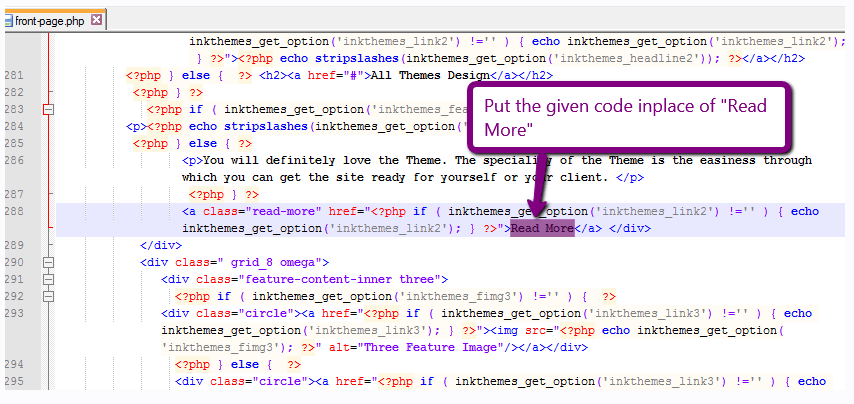
Then put the code in the text area, As shown in the image below. The en, de, it, fr ISO codes stands for English, German, Italian & French languages. You can similarly use the ISO codes for other languages as well.
Then this will convert the home page intro in the desired language when selected by user
Firstly the content is shown in English shown in image
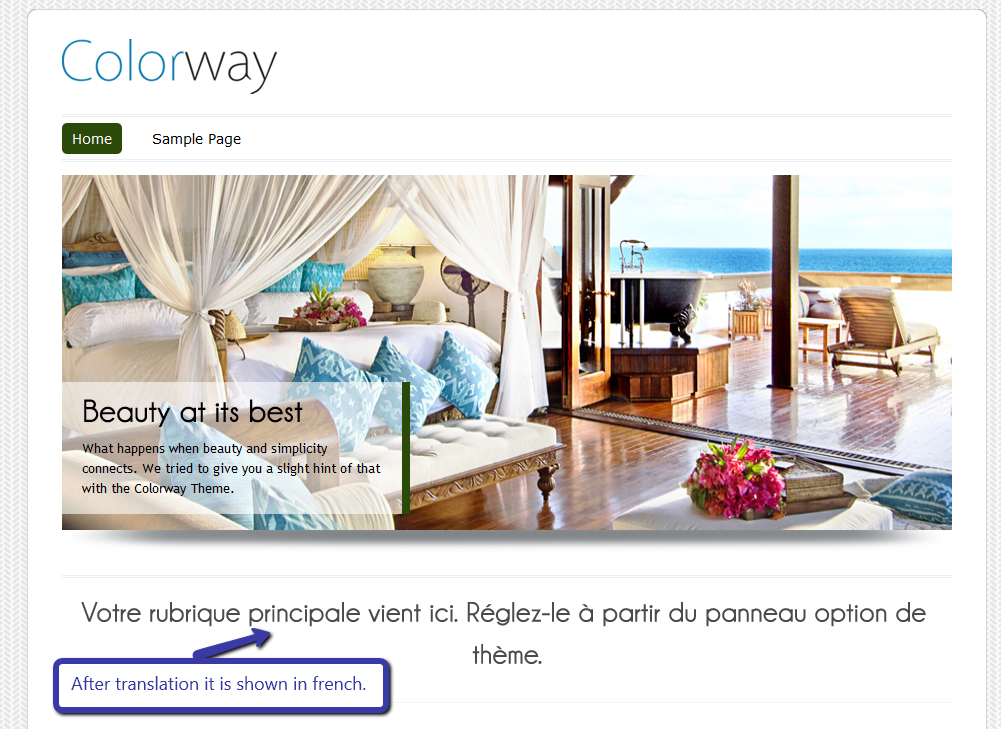
Now when we translate the intro in French then it will be shown like this
Adding the page in different language
To add the page in different language you have to just add a new page from page section
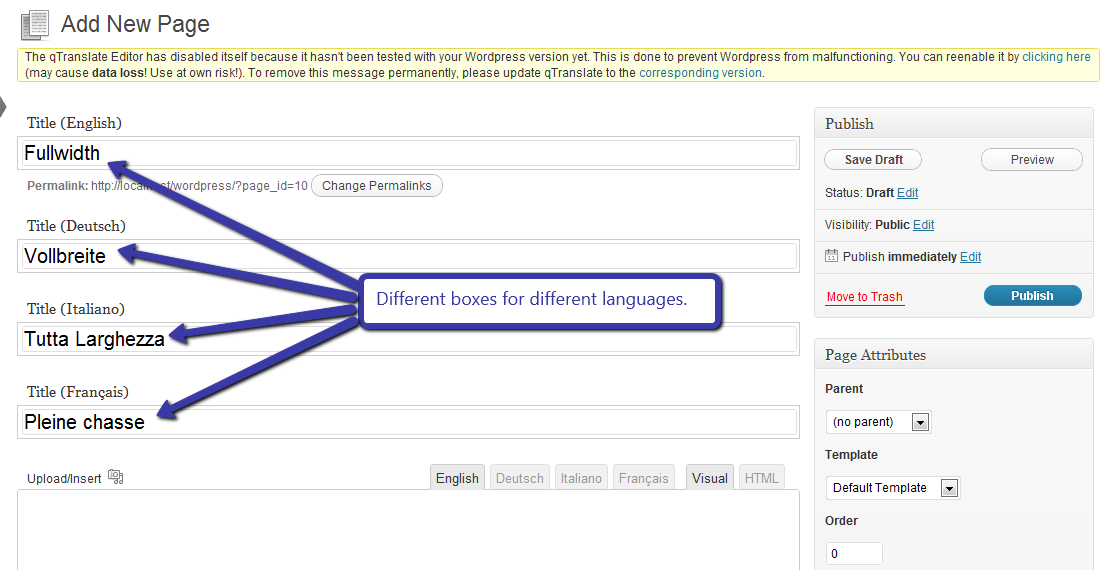
And put the heading in different language and also there are different tag for every language to write their content.
Suppose we are making the ‘Fullwidth’ page, then we will write the name in each text box.
And write the text in text area in each tab i.e.
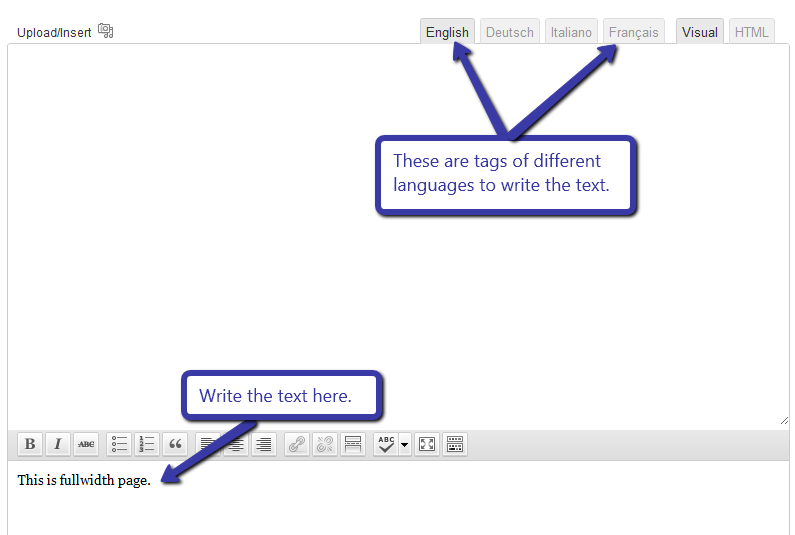
After writing the text publish the page.
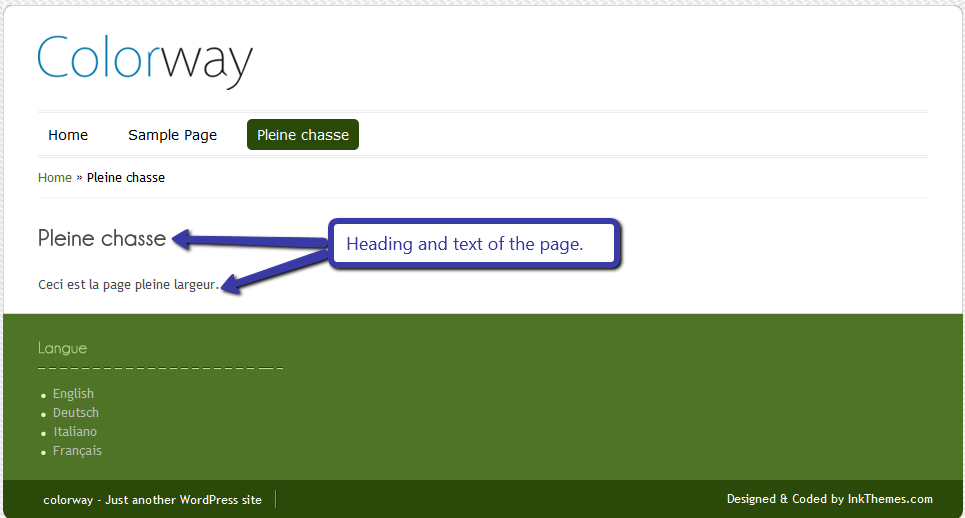
Now if we select the French language for fullwidth page the it will be shown like this
Adding the post in different language
To add the post in different language you have to just add a new post from post section
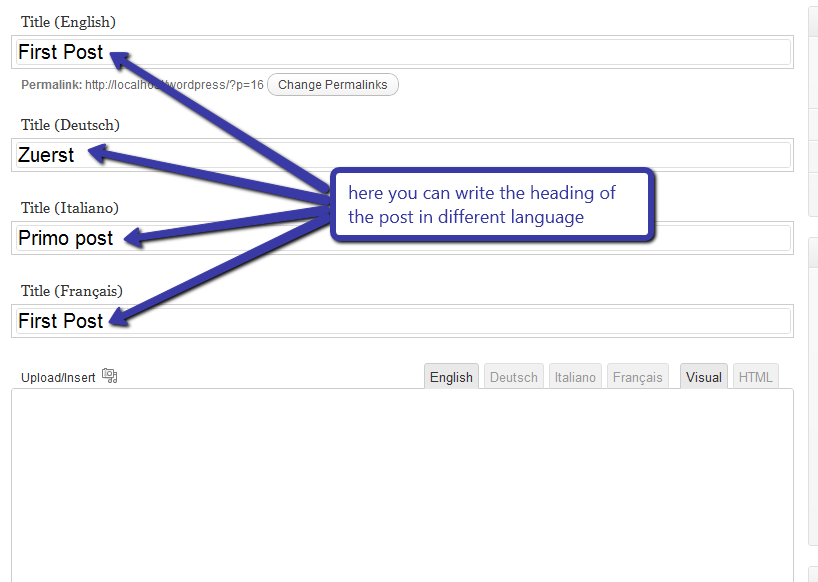
And put the heading in different language and also there are different tag for every language to write their content.
Suppose we are adding a post in blog page. Then we have to write the heading in different languages in text box. Shown in image
And write the text in text area in each tab i.e
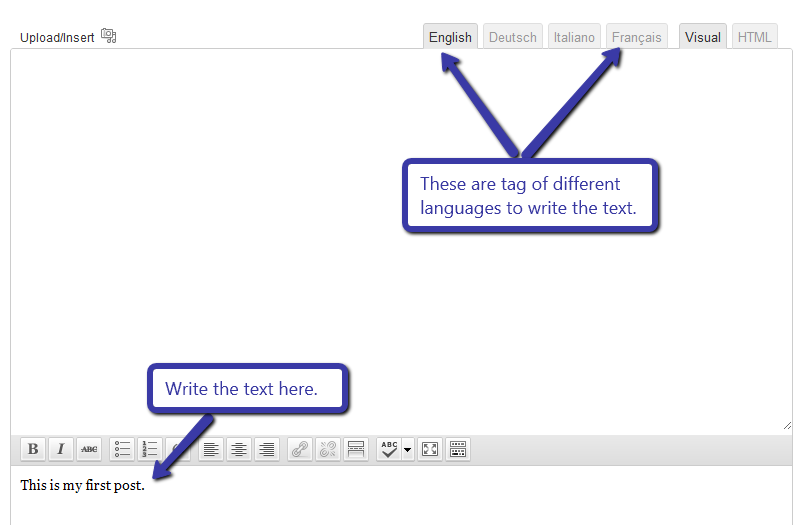
After writing the text publish the post.
Now if we select the French language for post then it will be shown like this
It’s really easy to convert your wordpress based website in different langauge with InkThemes Themes, Try and test it by yourself.
Colorway Theme URL: http://www.inkthemes.com/wp-themes/colorway-wp-theme/
If you have any other queries, you can ask in the Comment Form below.


I was looking for this article to implement this in http://www.ictblogging.com. Thanx buddy.
Thanks for the article. I managed to do most of the translations. But the one in the Home Page Intro doesn’t work. After saving it deletes all the tags from the text and shows just the English version on the site.
The code I use is:
Translation Services – English-RussianПеревод текстов с английского языка на русский
I guess the font doesn’t support Russian characters. Because this only happens in headings. Is there a solution for that? Thank you
What about with the menu or navegation??? is it possible to customize it in diffrent languages??
??????
Yes, you can change the menu/navigation with the help of qtranslate plugin.
I really can’t figure out how to translate the menu and navigation. Every time a choose English (not default), the menu stays in Dutch (default), can you please help?
hi , i am using colorway Colorway Lite Theme .
i installed qtranslate and working good but i can’t change theme options content ? language iso code is not working ? Please help
hello again
“home” link resets selected language: how to modify code? and how to change “home” link language ? for example “home” is turkish mean
“Ana Sayfa”
Thanks you saved me. I have a requirement from my client for danish vesion of a website and i tried this plugin but i got error intially.then gone thorugh this page and solved the issue. thanksssssss a lot
Hi Neeraj, I found this post useful and agree with functionality you describe. Thanks for the helpful step by step guide. The qTranslate plugin makes WordPress very multilingual friendly & is actually linked with a professional translation agency Live Translation which displays the price of the translation service in WordPress. Users can buy professional human translated website posts directly from the WordPress dashboard using PayPal, and the text is returned directly into WordPress. Yes as simple as that!
I have the same problem as some of the other guys above. I can use the ISO tags everywhere except for the headings. As soon as I press the “save option” button the tags dissappear.
Are there anyone who know how to deal with this?
I forgot to write that I use the Color Way Lite theme.
Lite version of the theme does not support many character, qtranslate works with the Pro version of the colorway theme as we have update the qfont to support many language.
I have the lite version, and after my little php tweak qTranslate works just fine. But then again, I have only tried it with swedish and english.
I forgott that I posted my solution in another thread on this forum. Here it comes:
After some digging in the php files I think I’ve finaly found a solution that let us use qTranslate ISO tags in the headers:
Open theme-funtions.php under the functions map. Look for these strings:
array(“name” => “Home Top Feature Heading”,
“desc” => “Enter the Heading for Home Top Feature”,
“id” => “colorway_slideheading1″,
“std” => “”,
“type” => “text”),
There is one set of strings for all the headings. Change the type to “textarea” ( that is “type” => “textarea”), ) in each of the heading string sets.
Now you will get a large textarea in the theme options page in which you can put your ISO tags. Rember to write all the tags on one row, without pressing enter after each tag.
Thank you so much Anders, i use your technic and all it’s ok except for the widgets !
Thank you so much, that’s help me so much
Shiraz
I have installed plugin qtranslate and event manager.
In admin section i have added location in event manager with two language but in front i show this type of data on location page.
can you please help me how to remove this extra language data.
WP version 3.3.1
data :
ahmedabadahmedabad
Hi there,
To display the flag any where. Use these short code
To display only flag instead of ‘both’ write ‘flag’ or To display only text ‘text’;
User these css style to manage:
———————————–
#qtranslate-chooser li { float:left; margin: 5px 5px 0 0; }
echo qtrans_generateLanguageSelectCode(‘both’);
Use “php” tag before and after
Hello,
One question : how to use your code to put the selector in the header for instance, or all above the website ?
Don’t get it…
Please and thx !
Jlouis
hi, there
i’m using qtranslate and it’s really working great , but is there is a way to make it works for widgets , to make my widgets multilingual including the widget title, and the plugins ?
hi! I´ve looking for a solution for my problem with qtranslate for a long time. I think i´m near it.
I´ve a problem wih qtranslate and the “skills” of my porftolio. You can see the Code in the front web. I´ve used it for the custom menus without problem, but it doesn´t work in the rest.
Thanks in advance
WOW, really awesome! Thanks author for the best plugin and tutorials!
thanks for this useful explanation
Jason is right!
How could us do it for the Widgets? I looked at this (http://www.wordpressninja.com/2012/01/how-to-translate-widgets-using-qtranslate-or-widget-logic/) but it doesn’t work, at least with my template (Responsive)…
Any solutions?
life is not so simple
I’ve read all posts and still cannot solve problem with translating entries title. Should be translated automaticly (like described in the first part of the tutorial) but are not. where is the problem?
Hi ,
First of all i thank you for giving us such a wonderful plugin fore most i have a query which stopped my work from many days.
I am using lightfolio theme in word press 3.4 and installed Qtranslate 2.5.30 it was success, my problem is i have seen only side bar widget area and i dragged the qtranslate widget to that area and changed the settings once i saved i could not see any difference in the site and i did not find language chooser. could you please tell me how to display the language chooser in my header part …
Please do the needful
But how to translate the menu???
Currently using Local Business Theme Pro with qTranslate plugin. Every works fine except how to translate the “Top Feature Heading” in the Leads Capture area.
The text is the main call to action for the entire site so its important that we can incorporate qTranslate with this area of text. Looking forward to hearing your repsonse, i’ve heard great things about your themes so far and this is my first time using one.
Solved, the answer was in front of me.
Thank you for the wonderful step-by-step explanation:)
All works well normally..but I am with Eclipse Pro theme and unfortunately the titles of the elements is a big issue with the qTranslate plugin.
anyway, thumbs up guys!
thank you for spelling this out.
Eevrything is working except for the links in the boxes. WordPress only allows me to put one link so every though the box is translated, the link redirects back to the English page. Is there any code I can include in the link section so that it can direct to the language being used?
Hi I have Cloratio theme, but the qtranslate does not work for me, so I instaalled the polylang plugin. My question is how do i translate the frontpage?
Really work, great plugin. Now I use it for all my WP site
is it possible to translate telugu language (indian language) to english
Hi, I’d like to add my language widget into the header. Is it possible? Thank you. a
Hello Alanajon,
Here is the link for the complete tutorial that will help you to translate your website with just a click of button. Google will translate your website as you choose different languages.
http://www.inkthemes.com/how-to-easily-make-your-wordpress-site-multilingual/10/
Thanks
Neeraj
Hi,
Great plugin and great tut.
Im using the same theme with qtranslation.
One huge problem though;
When I write a title and translate it in different languages, press the update button, my titles changes in …..
<!–:en–>Don't have an account yet? Sign up!<!–:–><!–:id–> Belum punya akun? Ayo daftar!<!–:–><!–:nl–>Nog geen account? Meld u nu aan!<!–:–><!–:it–> Non hai ancora un account? Crealo!<!–:–><!–:es–>¿No tienes cuenta? ¡Regístrate!<!–:–><!–:de–>Sie haben kein Konto? Jetzt registrieren!<!–:–><!–:fr–> Pas encore de compte ? Créez-en un ici !<!–:–>…..
1) How can I prevent this from happening?
2) My SEO titles is the same as the above title
Can you help me with this?
thnks in advance!
i can work with qtranslate but i cannot manage to get a bilingual menu bar? how can i do this?
how can you get the menu bar in two languages?
Hello!
I don’t know how to translate neither the skills or some titles from the home page. I don’t have the opcions for diferents languages here. And also, how I can use diferents images in the slideshow from the home because I have put text in there and I need to change theme.
Hello
i am using qtranslate but when i try to post the title show up in all languages what i am doing wrong.
let me know
thanks
Hi there mates, pleasant paragraph and fastidious arguments commented here, I am
truly enjoying by these.
nice one